Product photography
Alt text for product images: describe what helps someone buy.
A product gallery can show five different things about one item. Its alt text should make those differences useful: the color, the back view, the fastening or the detail that the product description cannot show on its own.
Start with the photograph's job in the product page
Before writing an alt description, ask why this photograph is in the gallery. The main image identifies the item. A rear view shows a different side. A detail photograph explains a closure, texture or connection. A lifestyle image may show scale or how someone uses the product. If two photographs reveal different information, identical descriptions usually lose something useful.
A workable starting pattern is product or item, relevant variant, then view or visible detail. 'Navy linen shirt, back view with a box pleat' tells someone more than 'shirt image 3.' You do not have to force every field into every description. If the page already introduces the product name clearly, the distinguishing visual detail may deserve more attention than repeating the full catalog title.
The examples in this guide are invented teaching scenarios. They are not specifications for real products, and you should not copy a material, size or performance claim unless it is correct for your item. W3C's informative image guidance provides the underlying principle: describe the information the image contributes in its context.
A product photo, described without guessing its specifications
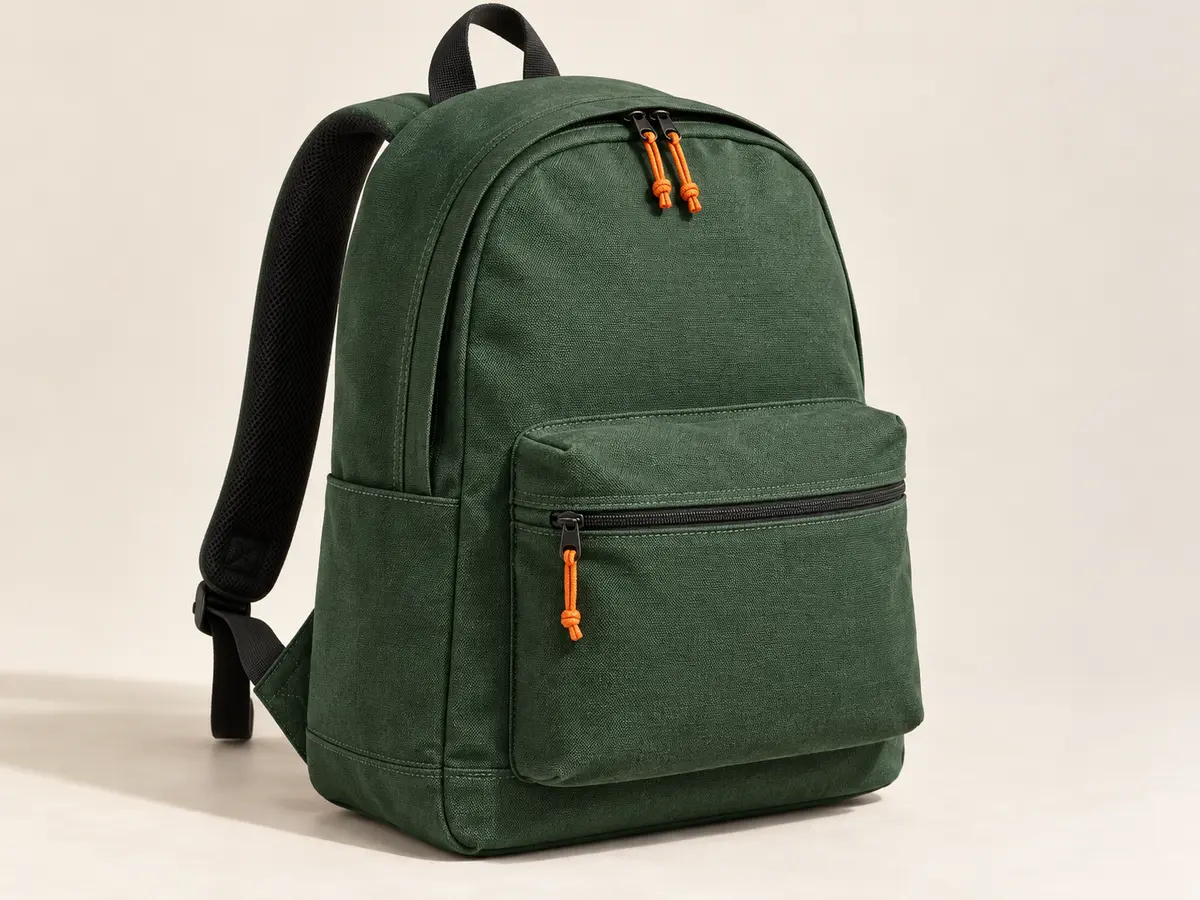
For this fictional backpack, a useful main-image description is 'Forest-green backpack with orange zipper pulls and a front zip pocket.' Those features are visible. Calling it waterproof, recycled, 20-liter or suitable for airline cabins would add claims that the photograph cannot verify.
If this same photograph illustrated an article about accessible zipper pulls, the description could focus on the orange cords instead. If the store used a crop of the front pocket, describe the pocket rather than pretending the full bag is visible. Alt text should follow the actual image a visitor encounters, including meaningful changes caused by cropping.
An AI alt text generator can draft this sentence, but a reviewer still needs to match the draft to the product and the view. Delete any material, capacity or durability claim that the catalog cannot confirm.
Alt text examples for clothing, shoes, furniture and small products
| Image and context | Useful alt text | Detail to verify |
|---|---|---|
| Shirt, front view | Navy linen shirt with a button-down collar, front view | The material and collar style match the product. |
| Same shirt, rear view | Back of the navy shirt showing a central box pleat | The pleat is visible in this view. |
| Sneaker, side view | White sneaker with a green heel panel and gum-colored sole | The colorway matches the selected variant. |
| Sneaker, outsole close-up | Sole of the white sneaker with a herringbone tread pattern | The tread pattern is visible and correctly named. |
| Sofa, room photograph | Three-seat beige sofa beside a small round side table | The seating layout is visible; avoid guessing dimensions. |
| Chair, joinery detail | Close-up of the wooden chair's curved arm and backrest joint | Describe the joint without claiming a construction method you cannot see. |
| Ring, profile view | Gold-colored ring with a raised oval blue stone, side view | Use a metal or gemstone name only when verified. |
| Cosmetics, shade swatches | Three lipstick swatches labeled Rose, Berry and Plum | Read the actual labels and preserve their order. |
| Mug, handle detail | Speckled cream mug with a wide curved handle | Do not infer capacity or dishwasher safety. |
| Headphones, folded position | Black over-ear headphones folded inward beside their case | The folding position and included items match the photo. |
| Lamp, illuminated room view | White table lamp casting light downward onto a desk | Avoid unsupported claims about brightness or color temperature. |
| Product packaging | Front of the coffee bag labeled House Blend and 250 g | Check the words and quantity against the packaging. |
These are patterns to adapt, not a library of finished descriptions for unrelated photographs. An alt tag copied from the wrong variant can be more misleading than a brief description. Open the exact file, identify what changed from the previous view and write only the detail that belongs there.
Product identity can matter even when the item looks ordinary. If the page is selling a named model and you have reliable catalog context, use that name naturally. Keep the product name where it helps. Leave prices, shipping offers and promotions in the visible product copy.
Color variants and image galleries need a consistent review
A common gallery mistake is copying the same alt text across every color. 'Blue running shoe' cannot describe a red variant just because both use the same product record. Test what happens when the customer changes a swatch. The main image, the thumbnail labels and any enlarged view should still make sense for the selected option.
For views of one variant, name what changes. 'Front view,' 'back view' and 'close-up of the buckle' are useful when they distinguish the information in the gallery. 'Image 1' and 'Image 2' describe your file order. They may help an editor find an asset, but they tell a shopper very little about the photograph.
Gallery controls add another layer. A thumbnail that is a button needs a meaningful accessible name for its action, such as opening the rear view. That name may come from the button or from an image inside it, depending on the markup. Do not assume a good alt attribute fixes an unlabeled control. W3C's functional image guidance explains the difference.
Some groups communicate one combined message and do not need the same message repeated on every image. Other galleries show different sides of an item. Review the group as a user experiences it, using W3C's group-of-images examples as a reference rather than applying a blanket rule to every gallery.
Show scale, labels and measurements where everyone can read them
A hand holding a product can show relative scale, but it does not prove the item's exact dimensions. Describe the relationship you can see and put verified measurements in the product details. A shopper should not have to infer the width of a bowl from an unfamiliar hand, whether they can see the image or not.
Size charts need more than a short image description. A useful alt text might identify the chart and point to the measurements presented beside it. Put the actual sizes and measurements in a readable table on the page. This also makes them easier to select, translate and use on a small screen.
When words printed on packaging matter, check them manually. Small type, stylized lettering and glare are easy places for AI to make errors. A label showing an ingredient warning or a quantity deserves careful transcription from reliable source material. Do not let a plausible generated number become a product fact.
You can keep an internal mapping with columns for filename, product, variant, view, description and review status. yaSEO's export maps the reviewed image filenames to alt text; your catalog system can hold the extra business fields. Keep identifiers separate from the sentence a visitor will hear.
Use product language naturally, without a keyword list
For a green backpack, 'green backpack' may be the clearest description and a relevant search phrase. Those words identify the item. Problems start when you append unrelated buying terms or repeat the phrase several times. Read the text aloud once. If it sounds like a search query pasted into an advert, edit it.
Google advises useful image context and descriptive alt text, and warns against keyword stuffing. Its image SEO documentation also treats the page around the image as part of the explanation. A carefully worded alt attribute cannot compensate for a product page that gives almost no useful information.
Use the space the image needs. A simple front view may need one short sentence; a complex detail may need more context elsewhere on the page. Do not pad a clear description to reach a word count or cut off an essential detail to satisfy an arbitrary character target. If a description keeps growing, ask whether some of that information belongs in visible product copy instead.
| Draft | Revision | Why |
|---|---|---|
| IMG_0481.jpg | Green backpack with orange zipper pulls | A camera filename does not describe the image. |
| Best cheap backpack buy backpack online green backpack sale | Green backpack, front view with a zip pocket | Remove search phrases that add no visual information. |
| Luxurious waterproof recycled travel backpack | Green backpack with a front zip pocket | Remove unverified quality and material claims. |
| Red shoe | White sneaker with a green heel panel, side view | Correct the variant and describe the actual photograph. |
When a product image can have empty alt text
A product image is not automatically decorative because a product name appears nearby. A gallery photograph often supplies information that the name does not: its shape, color, view or finish. Leaving that description empty can remove useful details from the page experience.
The opposite can also be true. A purely decorative texture behind a product heading may contribute nothing a text alternative needs to repeat. An image and adjacent text inside the same link may already provide a complete accessible name for that link. The correct treatment depends on the full markup and the image's purpose, not whether the file happens to be a product photograph.
Use an intentionally empty attribute only after that review. A missing attribute is a different case. The W3C alt decision tree is useful when you are unsure. For a basic explanation of the attribute itself, read what alt text means.
<img src="/images/green-backpack-front.webp"
     alt="Green backpack with orange zipper pulls, front view">

<img src="/images/decorative-paper-texture.webp" alt="">
A practical review before the descriptions go live
Start with a small, representative batch: the main image, a second view, one color variant and a detail photograph. Check the files against their product records. If those descriptions are hard to review, a batch of several hundred will only make the mistakes harder to find.
In yaSEO, upload the images or audit a public product page. Request an AI suggestion when you need a draft, supplying reliable product context. Apply the suggestion only after checking it, then edit the filename and description as needed. Keep a source copy of the images so you can revisit a compression or crop choice later.
Publish the files and apply the CSV's alt text in the CMS. For WordPress, check both the Media Library field and any existing image blocks. For Shopify or another store, inspect the selected variant and the actual storefront gallery. yaSEO currently prepares these edits; it does not push them automatically into a store.
Finally, open the page as a visitor. Check the main image, thumbnails, enlarged view and mobile layout. Run the image SEO audit again to confirm what is present in the page's HTML, while remembering that a JavaScript gallery may need a separate browser check. Keep the successful descriptions and fix the mismatches before moving to the next batch.
Common questions
Should product image alt text include the brand name?
Include it when the brand or model helps identify the product and you have reliable catalog information. You do not need to repeat a long brand-and-keyword phrase in every gallery image.
Should all images of one product have the same alt text?
Use descriptions that reflect meaningful differences between views. A front photograph and a close-up of a fastening often need different descriptions. Review repeated or grouped images in the context of the gallery.
Can AI write alt text for ecommerce images?
Yes, as a starting draft. Give it accurate product context and check variants, materials, labels and numbers before publishing. Do not treat a generated product claim as a verified specification.
Do filenames and alt text need to match?
They should refer to the same image, but they do not have to be identical. A filename is a short asset identifier; alt text is the text alternative for that image in its page context.
Can I import yaSEO alt text straight into WordPress?
Yes. Choose the WordPress export and use the free yaSEO Image Importer plugin. Preview and confirm the package to create new Media Library attachments with reviewed alt text. Existing product images, galleries and page placements still need to be updated in your editor.